Network behaviour is from running our own Ad Library lookups since April 2026, plus the third-party sources linked in the text. Setup steps checked against each client on September 25, 2026.
Every marketer has typed some version of this into Claude or ChatGPT: what ads is my competitor running on Meta right now, and which ones have they kept the longest? The answer is public. It sits in the Meta Ad Library, free, for anyone to read.
The assistant still can't answer it. It answers from memory: training data months old, for ads that turn over in weeks, and it has never seen most small brands' ads at all. So it guesses, fluently. Getting it real data turns out to be three separate problems, and none of them announce themselves.
Problem 1: the official API skips most ads
The obvious route is Meta's Ad Library API. It only covers political and social-issue ads, plus ads shown in the EU and UK. The ordinary commercial ads you actually want, a US skincare brand's current creatives, aren't queryable through it. Access also needs a government ID check and a registered developer app before the first call. The API post covers the gaps in detail.
Problem 2: the network
With no API for commercial ads, anything automated has to fetch the public Ad Library the way a person does. That is where it breaks.
Agents run in data centres. Hosted agents, from ChatGPT's agent mode to most agent platforms and anything you deploy yourself, run on rented servers. Meta, like most large sites, treats data-centre traffic as suspect. We learned this running our own lookups: from a data-centre server, the Ad Library came back with the ads stripped out. No error, no block page, no CAPTCHA. Just zero results, which an agent reports as "this brand isn't running ads".
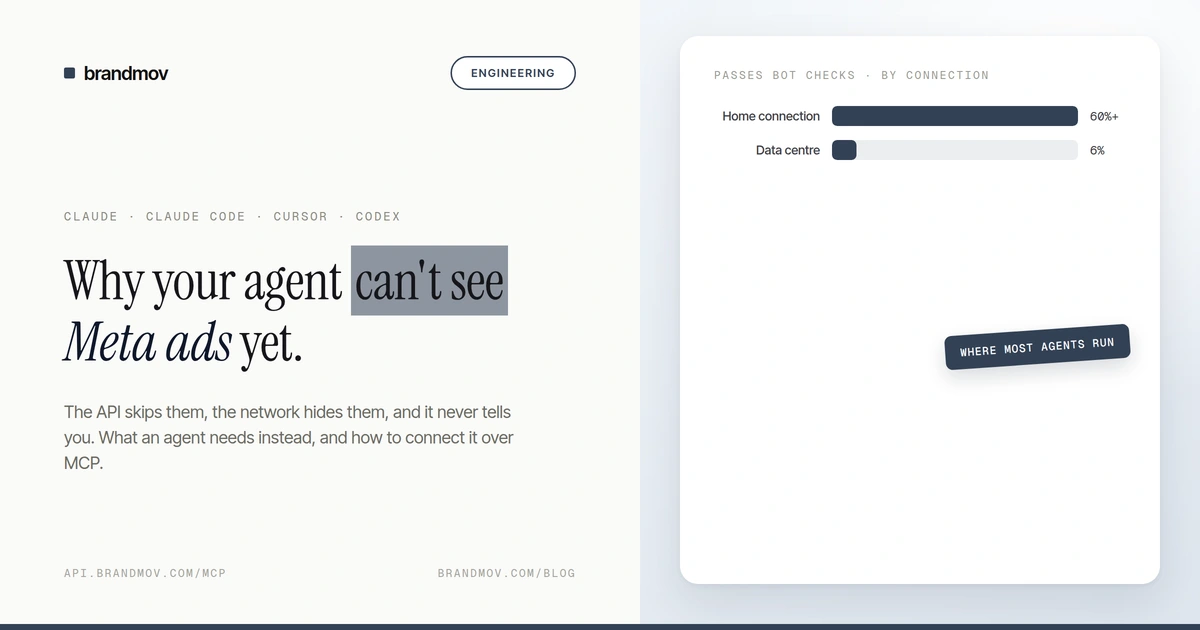
The IP is only the first check. Anti-bot systems also fingerprint the client itself, from the TLS handshake to dozens of signals that separate a person from a program, and some vendors now ship detections aimed at AI agent frameworks specifically. Kernel's 2026 write-up on agent bot detection measured data-centre traffic passing a major bot-protection network's checks about 6% of the time, against more than 60% for residential-grade connections.
The standard fix, a residential proxy, is its own job. You rent traffic routed through home internet connections, pay per gigabyte, rotate addresses, and match the proxy's country to the market you are researching. It works until it doesn't. When the proxy we used had its credentials lapse, every lookup came back empty rather than failing loudly, and it looked exactly like "no ads" until we went digging.
Even a clean connection wobbles. We have watched the same brand, on the same machine and network, return zero ads and then four ads a minute later, because Meta resolved the request differently each time. A person retries. An agent writes down the zero.
Problem 3: some answers aren't published
Outside the EU, a commercial ad leaves the library shortly after it is switched off, so "what did they stop running last month?" has no answer on any given day. There is no spend, reach or engagement for ordinary ads outside the EU either. The one honest performance signal is how long an ad has run, because nobody keeps paying for a losing ad for three months. An agent that doesn't know these limits fills the gaps with guesses.
Why it matters: every failure is silent
Look at what the three problems have in common. A stripped response reads as "no ads". A lapsed proxy reads as "no ads". A partial result reads as the whole account. None of them throw an error. They produce a clean, confident summary that reads like research.
You brief a designer off it, or decide a competitor has stopped pushing an offer, and the ads that would have changed your mind were never fetched. A partial answer you know is partial is useful. A partial answer that presents itself as complete is worse than none, because you stop looking.
The fix isn't a smarter prompt. It is a tool that hands the agent the ads directly, and tells it plainly whether it got all of them.
What the agent needs instead
The agent needs a handful of things: the ads as a list, the full copy and landing URL on each, every variant as its own record, the creative files themselves, a start date it can do arithmetic on, and a flag that says whether the list is complete. Plus someone else dealing with the network.
MCP (Model Context Protocol) is the open standard for giving AI assistants tools like that. A server publishes a list of tools with descriptions; the assistant reads the list and decides when to call one. You add a server once, by URL, and every conversation after that can use it.
Brandmov's server, at https://api.brandmov.com/mcp, exposes the Ad Library as a tool called search_ads. The agent passes a brand's Facebook page or a keyword, a country and a limit, and gets back structured ads. Here is how that maps onto each problem:
| On your own | search_ads over MCP | |
|---|---|---|
| Commercial ads outside the EU | Not in Meta's API | Included |
| Access | ID check and a developer app | Sign in once, connect by URL |
| Network | Data-centre IPs get empty responses; proxies lapse | Not your agent's problem |
| How long it ran | Work it out per ad | A start date on every ad |
| Did it get everything? | No way to tell | complete: false when it stopped at your limit |
| Ads that were switched off | Gone from the library | watchlist_diff shows what a tracked brand launched or turned off since you last looked |
The "did it get everything" row is the one that matters most. An agent that knows it saw 100 of 400 ads will tell you, or search again more narrowly. Without that signal, it reports what it got as the whole picture.
How to connect it
Setup takes a few minutes in any client that speaks MCP. Pick yours below.
Setup: claude.ai (web and mobile)
Go to Settings → Customize → Connectors → Add custom connector and paste https://api.brandmov.com/mcp. A Brandmov sign-in page opens. Sign in, click Allow, and the connector turns on. There is no key to copy: claude.ai connects with OAuth, so the permission lives in your Brandmov account and you can revoke it from your profile at any time.
Setup: Claude Desktop
If you already added Brandmov on claude.ai, you are done: web connectors sync to the desktop app. Otherwise, generate a key in the Brandmov dashboard under MCP and add this to your config file.
{
  "mcpServers": {
    "brandmov": {
      "url": "https://api.brandmov.com/mcp",
      "headers": {
        "Authorization": "Bearer bm_live_..."
      }
    }
  }
}Quit the app fully and reopen it. Closing the window is not enough. If you have both a web connector and a local entry, disconnect one of them; the web connector wins and the two will confuse you.
Setup: Claude Code
claude mcp add --transport http brandmov https://api.brandmov.com/mcp \
--header "Authorization: Bearer bm_live_..."Setup: Cursor
{
  "mcpServers": {
    "brandmov": {
      "url": "https://api.brandmov.com/mcp",
      "headers": { "Authorization": "Bearer bm_live_..." }
    }
  }
}Setup: Codex
[mcp_servers.brandmov]
url = "https://api.brandmov.com/mcp"
bearer_token_env_var = "BRANDMOV_API_KEY"Anything else that speaks streamable HTTP (Cline, Continue, your own agent) takes the same two things: the URL and an Authorization: Bearer header. Writing your own agent on the Claude API? The API post has the connector code.
The tools that matter for ad research
| Tool | What it does |
|---|---|
| search_ads | Live search of the public Ad Library by keyword or Facebook page, one country at a time, up to 100 ads |
| watch_brands_list, watch_brand_ads | Browse brands Brandmov already tracks, without waiting for a live search |
| watchlist_add, watchlist_diff | Follow a competitor and see what they launched or turned off since last time |
| swipe_file_save_ad | Save an ad the assistant found into a swipe file you can share |
The full list, with every parameter, is in the tool reference.
Prompts that get good answers
The assistant will pick the tool itself. What you control is how specific the question is. Four that work well:
Pull [brand]'s active US Meta ads. Group them by offer, and tell me
which offer has been running the longest.

Search US ads for "olive oil", then list only the advertisers that
actually sell olive oil.

Find every ad from [brand] that links to a page other than their
homepage, and list the landing pages.

Compare the ad formats [brand A] and [brand B] are running right now.
Say if either search hit the limit.Two habits make the answers better. Give the assistant the brand's Facebook page when you know it, because keyword search in the Ad Library matches any ad that mentions the phrase, and a search for "olive oil" returns grocery delivery apps and meal kits before it returns an olive oil brand. And ask it to report when a search hit its limit, so it never presents 25 ads as a brand's entire account.
Meta's own MCP, and how this differs
Meta now runs an official MCP server for managing ad accounts, and it includes an Ad Library search. It is the right choice if your main job is running your own campaigns. Its library search works through your connected ad account.
Brandmov's server is built the other way round: research first. search_ads needs no ad account, returns creatives and landing pages in one flat shape, and sits next to watchlists and swipe files so the research has somewhere to go.
Next: the MCP quickstart walks through connecting your first client. For ready-made research flows, see competitor teardown and automated watchlist monitoring.